


Nationwide SmartRide®
4.4548.00 Reviews
App Specs
- Version
- nwsmart-v4.4.0.0-98115-g88ef6c5-prod
- Updated On
- License
- Free
- Downloads
- 100,000+
- Developer
- Nationwide
- Categories
- Auto & Vehicles
- Platform
- Android
Screenshots
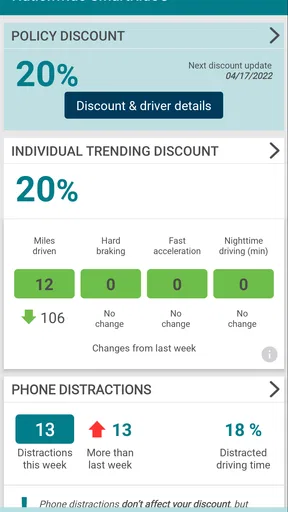
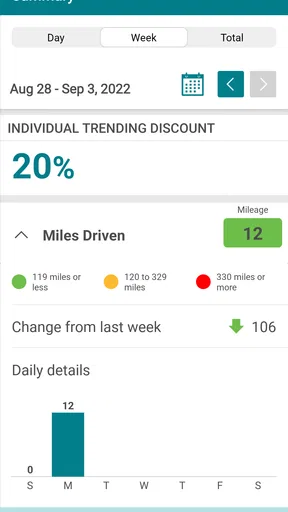
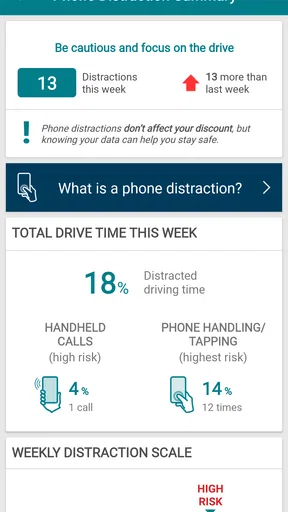
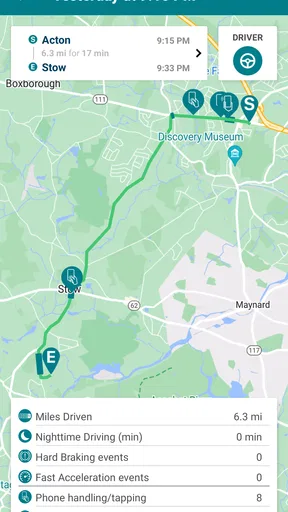
 Analysis by AppCompare
If you are trying to make your car insurance feel less disconnected from the way you actually drive, Nationwide SmartRide® takes a focused approach: it uses driving information to support a potential auto-insurance saving opportunity. I see it less as a general insurance-management app and more as a companion for people who are willing to let their driving habits become part of the conversation with their insurer.
That distinction matters. This is not an app I would install simply to browse vehicle news, compare every insurance provider, or replace a full roadside-assistance service. Its value is tied to the SmartRide program and to the practical question of whether your driving behavior can help you save on auto insurance. In my experience, that makes the app appealing for a careful driver who wants a more behavior-based insurance experience, but less compelling for someone who dislikes driving monitoring or wants a broad collection of car tools in one place.
How the driving-based saving idea works in everyday use
The central capability is straightforward: Nationwide SmartRide connects driving behavior with an insurance-saving process. Instead of treating every policyholder in exactly the same way, the program gives safe-driving information a role in evaluating the opportunity to save. The app therefore has a very specific job. It helps turn ordinary trips into information that can be used within Nationwide’s SmartRide experience.
I like this concept because it gives the driver something concrete to work toward. Traditional insurance apps often concentrate on policy documents, payment details, claims, or contact options. Those functions can be useful, but they are mostly administrative. SmartRide adds a behavioral layer: the way I drive becomes relevant to the insurance relationship rather than remaining invisible between renewal conversations.
The important practical point is that the app is not a magic discount button. Installing it does not, by itself, make a driver safer or guarantee a lower bill. The useful outcome depends on participating properly, driving consistently, and being comfortable with the way driving information is used in the program. I would approach it as an ongoing driving review, not as a one-time coupon.
That also changes how I would judge the app. A normal utility app can be evaluated by how quickly it opens a screen or completes a form. Here, the real test is whether it makes participation understandable and manageable. If the app helps me see what is happening with my driving activity and keeps the process clear, it is doing its job. If I expect instant savings without changing anything about my driving, I am likely to be disappointed.
What I would do before starting
Before enrolling or beginning a driving period, I would first make sure I understand the program’s current participation steps inside the app. I would also check that the phone is suitable for the experience and that I can keep my usual driving routine rather than treating the first few trips like a staged test. A short burst of unusually cautious driving would not tell me much about my normal habits.
Worth Reading Before You Choose

EA SPORTS FC Mobile 26 Is a Bigger Football Game, but It Takes Time

Flipboard Shows What News Apps Must Do Beyond the Feed

Switching to Android Auto Means Rethinking Your Driving Routine

Google Calendar Makes a Crowded Week Easier to Manage

Ludo King Makes the Most of the Minutes Between Plans

Baby Panda World Brings Quick Play to Modern Phones, but Its Game Library Feels Busy
My next step would be to think about who drives the vehicle most often. If several people regularly use the same car, the usefulness of the information may depend on how the program handles that situation. I would want every regular driver to understand that the app is connected to an insurance-saving process, especially before lending the car to someone who may drive very differently.
One non-obvious advantage of this preparation is that it prevents a common mistake: focusing only on the final discount while ignoring the quality of the participation period. I would keep the phone charged, avoid changing how I handle it while driving, and review the app when parked rather than trying to interact with it on the road. The safest workflow is also the least distracting one.
A realistic week with SmartRide
Imagine my normal week: a commute on weekdays, a grocery trip in the evening, and a longer drive to visit family at the weekend. With SmartRide in the background of that routine, I would not want to create special journeys just to produce a better-looking record. The honest value comes from seeing how my ordinary driving fits the program, including the less polished parts of real life.
For example, I might begin the week feeling confident because the commute is familiar and predictable. Then a crowded school-zone route or a rushed trip across town could expose habits I rarely notice from behind the wheel. That is where a driving-based insurance tool can be more useful than my own memory. I may believe I am a consistently calm driver, yet still discover that time pressure changes the way I approach certain trips.
The app’s role in that situation is not to lecture me. Its role is to give the SmartRide process a digital place where participation can be followed and understood. I would check it only when parked, look for any available progress or guidance, and use that information to reflect on the next trip. The best result is not obsessing over every journey; it is noticing repeatable patterns and making safer choices without turning driving into a game.
There is a useful trade-off here. A driver who already pays attention to smooth, patient driving may find the program easy to fit into daily life. A driver who frequently takes last-minute trips, shares a car, or changes phones may need more discipline to keep participation orderly. The app can support the process, but it cannot remove the real-world complexity of driving.
The strongest scenario: a careful driver with a regular routine
The clearest use case for me is a policyholder who drives regularly, owns or consistently uses one vehicle, and wants insurance to reflect responsible habits. A predictable commute is not required, but a stable routine makes it easier to participate without constantly wondering whether an unusual trip has distorted the experience.
That person may already be interested in saving money but unwilling to switch insurers immediately. SmartRide offers a way to explore a behavior-based option within Nationwide rather than relying only on broad market assumptions about drivers. The appeal is especially strong when the driver sees safe driving as a daily habit instead of a temporary challenge.
Consider a parent who makes repeated local trips and wants to encourage calmer driving in the household. The app could become a conversation starter: not a tool for shaming anyone, but a reason to discuss leaving earlier, avoiding rushed decisions, and treating phone interaction as something to handle only while parked. The financial angle may motivate the family, while the safer routine is the more lasting benefit.
Another strong scenario is a driver who has recently become more deliberate behind the wheel. Perhaps the person now commutes less aggressively, leaves more room in traffic, and avoids unnecessary distractions. A program centered on driving behavior may feel more relevant to that driver than a standard insurance app that only displays policy information. The app gives those habits a practical context.
Where the experience can feel demanding
The biggest limitation is also the defining feature: participation involves driving information. Some people will consider that a reasonable exchange for a possible saving opportunity; others will regard it as too intrusive, regardless of the potential benefit. I would not recommend this app to someone who is fundamentally uncomfortable with telematics-style insurance programs. That discomfort can overshadow every other advantage.
There is also a psychological cost to being aware that trips are being evaluated. Even a careful driver might become overly focused on whether every journey is being recorded correctly or whether one difficult traffic situation will matter. I think the healthiest approach is to use the app as feedback about broad habits, not to chase perfection on every trip.
Another friction point is that real driving is messy. Weather, road construction, passengers, unfamiliar streets, and sudden traffic changes can all affect how a trip feels. An app connected to a driving program cannot make those conditions disappear. Anyone expecting a simple score that captures every circumstance perfectly should lower those expectations.
I would also skip it if I rarely drive the insured vehicle or if my vehicle use changes constantly. The more irregular the routine, the harder it may be to feel that the program represents my everyday behavior. In that case, a conventional insurance app focused on documents, payments, and claims may be a better fit, because those functions remain useful even when driving patterns are unpredictable.
SmartRide compared with ordinary insurance apps
Most insurance apps are built around account management. They help users find policy details, handle routine tasks, or contact the insurer. That model is convenient because it asks little from the driver beyond opening the app when needed. SmartRide is different in emphasis: it makes driving behavior the main reason to participate.
Compared with a generic driving tracker, its advantage is relevance to the insurance relationship. A standalone tracker may show trips or driving information for personal awareness, but SmartRide connects the idea of driving feedback to Nationwide’s auto-insurance saving program. That connection is the reason to choose it, not a promise that it will replace every other driving tool.
Compared with simply shopping for a cheaper policy, the app offers a more personal route. Price comparisons look at available plans and driver details, while SmartRide asks whether my own driving habits can contribute to the outcome. Neither approach is automatically better. Shopping around is still the wiser option if my current policy is no longer competitive, while SmartRide makes more sense when I value staying with Nationwide and want a behavior-based opportunity.
I would also distinguish it from navigation or vehicle-maintenance apps. Those products help me get somewhere or keep the car in shape. SmartRide is about the insurance consequence of driving behavior. Installing it alongside other car apps may be useful, but I would not confuse its purpose with route planning, repair scheduling, fuel tracking, or emergency support.
Small habits that make participation easier
My first practical tip is to review the app only when the vehicle is stopped. That sounds obvious, but a program designed around driving can tempt users to check progress at the wrong moment. I would treat the app like a post-trip tool, not a dashboard control.
Second, I would keep the phone in a consistent, safe location and avoid handling it during journeys. Consistency reduces confusion and supports the broader goal of safer driving. I would not rearrange the phone repeatedly, switch between apps while moving, or try to troubleshoot anything in traffic.
Third, I would judge the experience over a normal stretch of driving rather than after one trip. A single journey can be unusual, while repeated routines reveal whether the program fits my life. This is especially important for people who are deciding whether the possible savings justify the monitoring. The right question is not “Did today look perfect?” but “Can I participate comfortably as I really drive?”
Finally, I would use the app as a prompt for household agreement. If another person uses the car, everyone should know that their driving may be part of the practical context. Clear expectations are better than discovering a mismatch after the program is already underway.
Who benefits most, and who should pass
I think the best audience is a Nationwide customer who wants a free way to explore insurance savings through safer driving and who is comfortable with the basic idea of driving data being part of the process. The app is also a good match for people who appreciate measurable routines and are willing to make gradual changes rather than expecting an immediate result.
It is less suitable for someone who wants a complete auto-and-vehicle toolbox, a traditional quote-comparison service, or a purely administrative insurance app. It may also frustrate drivers who dislike monitoring, share a vehicle with many people, or drive too irregularly to feel represented by a participation period.
The app is free, carries an Everyone age rating, and comes from Nationwide. It has reached over one hundred thousand installs and holds a 4.4 average from around one thousand ratings, which suggests that many users find the concept worthwhile while still leaving room for individual experiences to differ. I would treat those figures as context, not as a guarantee that the program will suit my driving situation.
On the technical side, it requires Android 10 or later, and the current release is identified as nwsmart-v4.4.0.0-98115-g88ef6c5-prod. That requirement is worth checking before planning participation, particularly if the phone is older or rarely updated. A free app is only useful when the device can run it reliably throughout the driving routine.
My recommendation after weighing the trade-offs
The real strength of Nationwide SmartRide is its focused connection between everyday driving and an insurance-saving opportunity. It gives careful drivers a reason to pay attention to habits that are easy to overlook, and it makes the insurance experience feel more connected to behavior than a standard policy-management app does.
My recommendation is conditional but positive. If I were already insured with Nationwide, drove regularly, and accepted the idea of participating in a driving-based program, I would try it. I would begin with realistic expectations, keep my normal routine, and use the app only when parked. I would also compare the overall value of my insurance separately rather than assuming that a possible SmartRide saving automatically makes the policy the best choice.
If privacy concerns or shared-vehicle complications are likely to make every trip stressful, I would skip it and use a conventional insurance-management option instead. For the right driver, though, this is a practical and unusually specific app: not a general car companion, but a way to connect safer driving habits with the insurance relationship. That narrow purpose is exactly why it can be useful.
Pros
- Tracks driving habits and provides feedback to encourage safer driving.
- Can help identify risky behaviors such as hard braking or rapid acceleration.
- Offers a convenient way to manage SmartRide participation from a mobile device.
- May provide personalized insights based on recorded trips and driving patterns.
- Useful for drivers seeking greater awareness of their everyday driving habits.
Cons
- Requires location and driving-data access
- which may concern privacy-conscious users.
- Background tracking can increase battery consumption during frequent driving.
- Feedback may be less accurate when GPS signals are weak or unavailable.
- Not all features or benefits may be available to every Nationwide policyholder.
- Requires consistent app use and phone placement for reliable trip detection.
FAQs for Nationwide SmartRide®
What is Nationwide SmartRide® and how does it work?
Nationwide SmartRide® is a usage-based insurance program designed to help eligible Nationwide customers understand how their driving habits may affect their auto insurance costs. After enrollment, the program uses information collected during your trips—such as mileage, time of day, acceleration, braking, and driving patterns—to create a driving score or discount assessment. Availability, scoring methods, and program terms may vary by state and policy.
What information does Nationwide SmartRide® collect from my driving?
The program may collect driving-related details such as how far you travel, when you drive, sudden acceleration, hard braking, and other indicators used to evaluate driving behavior. Depending on the version and device you use, this information may come from a smartphone application or another approved tracking method. Before enrolling, review the app’s permissions and Nationwide’s privacy policy to understand how data is collected, stored, shared, and used.
Can Nationwide SmartRide® lower my insurance premium?
SmartRide® may provide an insurance discount or other policy benefit when you participate and demonstrate qualifying driving behavior, but savings are not guaranteed for every driver. The final result can depend on your state, policy, enrollment rules, driving data, and the completion of the required monitoring period. The app should be viewed as a way to potentially earn savings, not as a promise of a specific discount.
Does Nationwide SmartRide® track me all the time?
SmartRide® is intended to record driving activity during the program period, but the exact tracking behavior depends on the app version, phone settings, permissions, and Nationwide’s current terms. You may need to enable location, motion, or activity permissions for accurate trip detection. If you have privacy concerns, read the consent information carefully and check your device settings before starting, since disabling permissions could affect trip recording or program eligibility.
What should I do if SmartRide® records a trip incorrectly or stops working?
If a trip is missing, categorized incorrectly, or recorded while you were not driving, first confirm that the app is updated and that location, motion, notifications, battery access, and background activity permissions are enabled. Avoid force-closing the app or using aggressive battery-saving settings, which can interrupt tracking. You should then review the available correction or support options in the app and contact Nationwide promptly, especially before the monitoring period ends.


